The turn panel
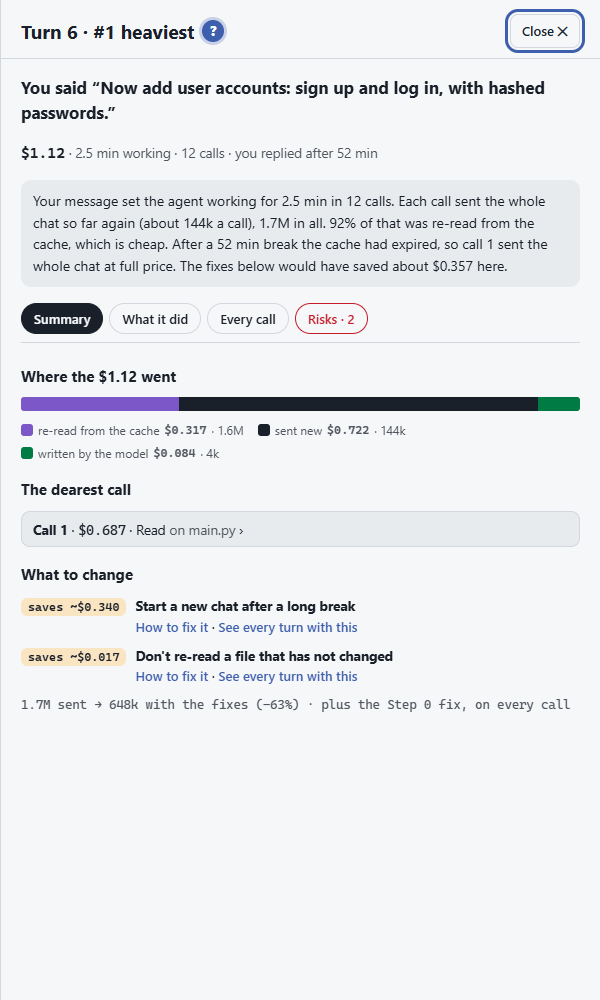
Tap any tile on the path and the turn panel opens. It tells the story of that one turn: what you asked, what the agent did, and where the money went.
The top line
Section titled “The top line”- Turn 7 · #2 heaviest: the turn’s number, and its rank if it is one of the dearest.
- You said “…”: the message that started the turn.
- Cost · time working · calls: what the turn cost, how long the agent worked, and how many calls it made to the model. Calls made by a helper agent are counted separately.
- You replied after …: how long you took to answer. A long gap can mean the cache ran out, so the next turn paid full price again.
The tabs
Section titled “The tabs”| Tab | What it shows |
|---|---|
| Summary | Where the money went (re-read from the cache, sent new, written by the model), what would have saved the most, and the dearest call. |
| What it did | The tools the agent used in this turn, step by step. |
| Every call | Each call to the model in the turn, with its size and price. |
| Risks | Only when the turn had risky steps: what they were. See Trace & risk map. |
Why one turn costs more
Section titled “Why one turn costs more”The usual reasons, and what to look for in the panel:
- The chat had grown long. Every call re-sends everything before it. Look at the purple part: it is the earlier chat read again from the cache.
- The agent made many calls. Each tool step is another call that re-sends the chat. Look at Every call.
- A big file or a long command output came in. It stays in the chat and is sent again on every later turn.
- The cache ran out. After a break, the chat is sent new at full price instead of the cheap cache price.
The panel’s What to change points at the fix that fits. The fixes themselves are in How to save.