Fixes and safety rules
How to save
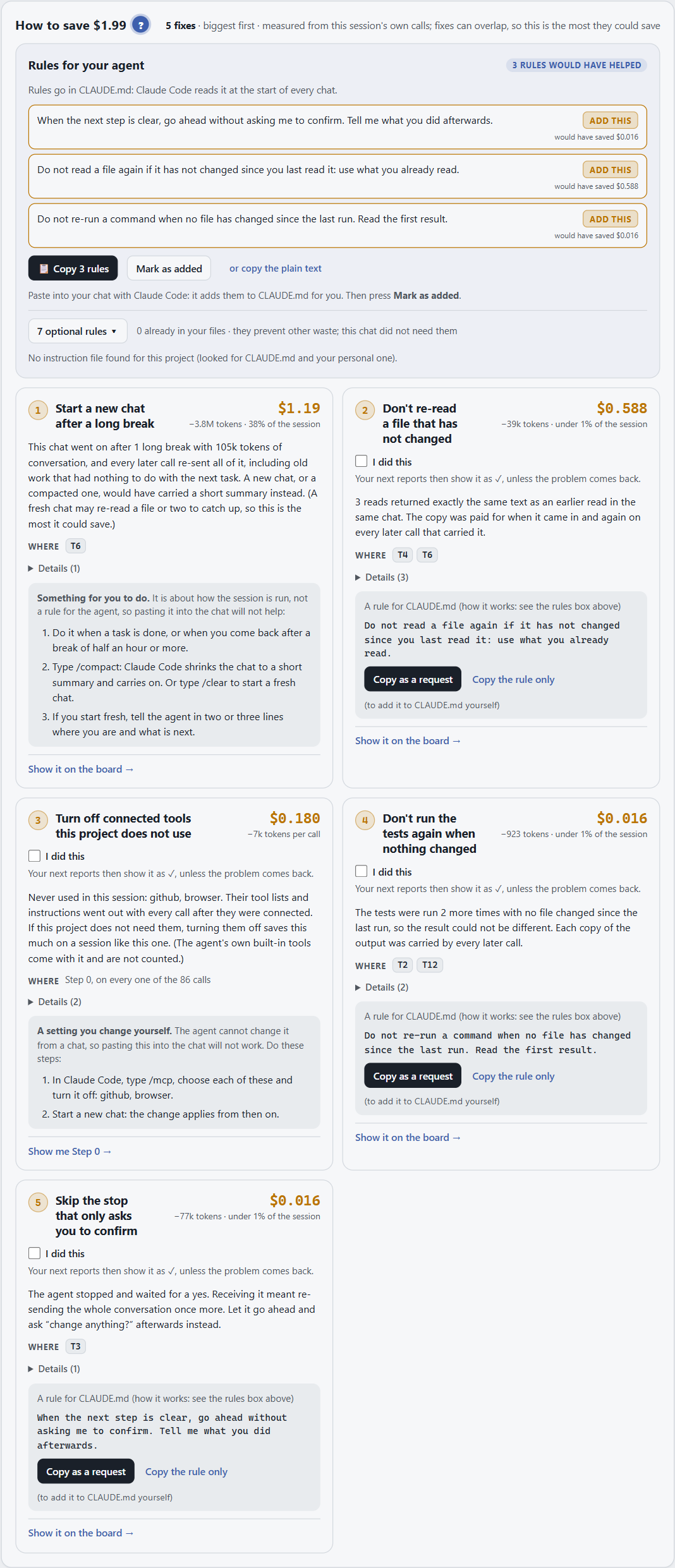
Section titled “How to save”How to save lists every fix for this chat, dearest first. Each fix card shows:
- what it saves, in money and tokens, worked out from this chat;
- which turns it touches: highlight them on the path to see where;
- the rule to paste: a short instruction for your agent. Copy it into your rules file (
CLAUDE.mdfor Claude Code,AGENTS.mdfor Codex, Cursor rules for Cursor).
Above the cards, Rules for your agent collects the recommended rules in one block to copy at once.
Tick I did this on a fix and the report stops repeating it in later chats.
How the saving is counted
Section titled “How the saving is counted”Each saving is measured from this chat: the tokens that the fix would have kept out, priced like the rest of the report. A saving is an estimate of what this chat would have cost with the fix, not a promise for the next one. See How the money is counted.
Safety rules
Section titled “Safety rules”When the Trace & risk map finds risky steps (a push, an install, reading a secret, a script piped from the internet), Safety rules appears with rules to paste that stop those steps next time. It only shows when there is something to fix.
The rules come in the language of the agent the chat was with:
| Agent | Where the rules go |
|---|---|
| Claude Code | .claude/settings.json: deny and ask permissions |
| Codex | ~/.codex/rules/default.rules: prefix_rule lines (commands only) |
| Cursor | .cursor/cli.json: a deny list (Cursor has no ask list) |
| Antigravity | ~/.gemini/antigravity-cli/settings.json: deny and ask lists |
| Copilot CLI | --deny-tool flags when you start it (one session only) |
Each comes with a link to that agent’s own docs. Every agent also gets the same rules in plain words, for its rules
file (CLAUDE.md, AGENTS.md, Cursor rules). For Codex, Cursor and Antigravity, the section also shows how to turn the
SessionCost guard on there: sessioncost guard setup codex (or cursor, antigravity), then sessioncost guard on.
For a check while the agent works, rather than after, see the guard.